EVERY ORDER SUPPORTS FAMILIES IN NEED



MCX5 burs: PMMA, PEEK, WAX
Related products
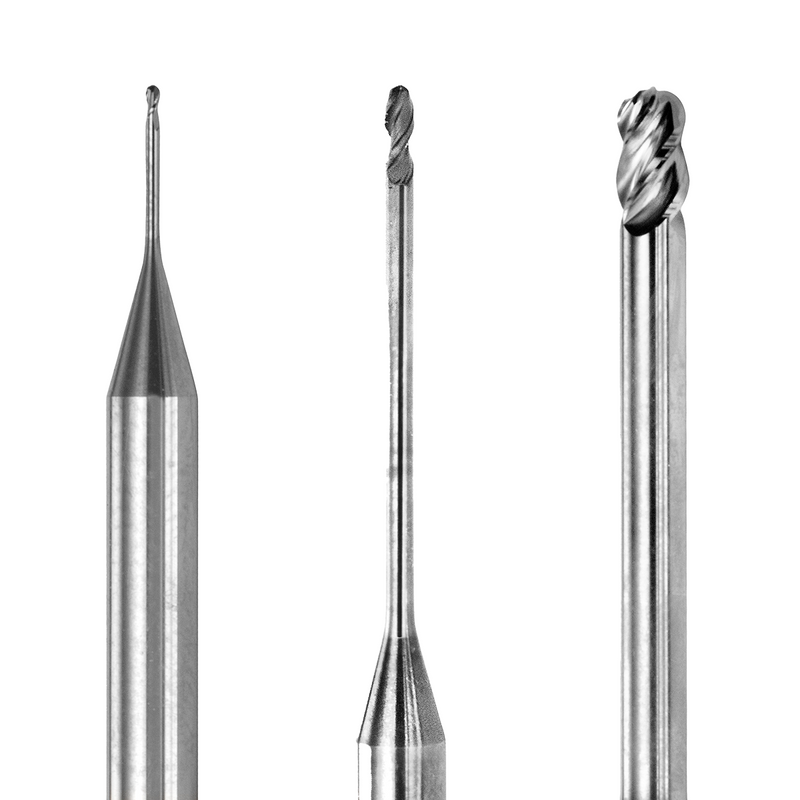
MC X5 PMMA milling burs, also for PEEK and wax
These are uncoated Eagle milling burs compatible with the inLab MC X5, made for PMMA, PEEK and wax. They come in the three sizes the MC X5 uses for soft materials, 0.5, 1.0 and 2.5 mm, and work in both wet and dry milling.
Each pack holds one bur in the size you choose, so you can replace only the tool that is worn.
MC X5 soft-material bur sizes
| Size | Typical job | Compatible with REF |
|---|---|---|
| 2.5 mm | Roughing and bulk removal | 6478031 |
| 1.0 mm | Outer contours and inner surfaces | 6478049 |
| 0.5 mm | Fissures, margins and narrow areas | 6478056 |
The size is the cutter diameter in millimeters. Your inLab CAM software assigns the tools for each job, so most labs keep all three sizes on hand. The REF column shows which original tool each Eagle bur replaces.
How to read the variant names
The variant name is the tool size in millimeters: 0.5, 1.0 or 2.5. Each variant is a single bur. Thin tools such as the 0.5 mm are the most fragile, so many labs keep a spare of that size on hand to avoid stopping a job halfway.
What these PMMA, PEEK and wax milling burs are for
- PMMA - temporary crowns and bridges, try-ins and long-term provisionals
- PEEK - frameworks and other high-performance polymer restorations
- Wax - burn-out patterns for pressing and casting
An uncoated cutting edge stays sharp in soft materials and clears chips cleanly, which helps avoid smearing and melting in PMMA and wax.
Choosing MC X5 burs by material
- PMMA, PEEK and wax: uncoated burs like these, wet or dry.
- Zirconia: coated MCX5 zirconia milling burs.
- E.max and glass ceramics: MCX5 diamond burs for E.max, used wet.
Keeping one set of burs per material group stops abrasive materials from dulling the sharp edge you need for polymers.
Wet vs dry milling on the MC X5
The MC X5 can mill wet or dry, and these burs work in both modes. Your inLab CAM software sets the mode for each material, so follow its recommendation for PMMA, PEEK or wax.
How to replace a bur in the inLab MC X5
Follow the inLab MC X5 operating instructions and your inLab CAM software for the exact steps. In general:
- Make sure the machine is idle and the spindle has stopped.
- Remove the worn bur from its tool position and check the size.
- Clean chips and dust from the tool holder.
- Insert the new bur straight into the correct position, without forcing it.
- Confirm the tool change in the software so the tool's usage is tracked from zero.
When to replace PMMA and wax milling burs
Soft materials wear burs more slowly than zirconia, but the edge still dulls. Replace the bur when you notice:
- Melted or smeared PMMA on milled surfaces
- Fuzzy or torn edges on wax patterns
- Chips sticking to the bur or clogging the flutes
- Longer milling times or rougher surfaces than usual
- A chipped edge or bent tip
- A tool-wear message in your inLab software
Tips for bur life and surface quality
- Use these burs only for PMMA, PEEK and wax.
- Clean the tool holders and milling chamber regularly so chips do not pack into the flutes.
- Store spare burs in their packaging so the edges are protected.
- Do not reuse a bur that was dropped or has a chipped edge.
Common soft-material milling problems
- Melting or smearing: a dull bur generating heat instead of cutting.
- Rough wax surfaces: a worn bur or chips building up in the flutes.
- Broken 0.5 mm bur: a worn tool, a bur not seated correctly or debris in the holder.
- Loose-fitting temporaries: worn burs on inner surfaces; also run the machine's calibration.
Eagle burs, not original tools
These are compatible Eagle burs, not original manufacturer tools. Machine names and REF numbers are listed only to show which unit and tool positions they fit.
Ready to Subscribe?